Day 1 – Intro
Setup journal page with Next.js
Right from the start, it became clear to me that I want to have something more flexible than what the existing Github Pages generated via Jekyll (opens in a new tab) would give me for the journal.
So I decided to quickly configure my own static site generation with Next.js (opens in a new tab) for the journal page, which allows for easy integration of p5.js (opens in a new tab) experiments as well.
Next.js (opens in a new tab) is a static site generator based on React (opens in a new tab). It allows to easily generate new pages (opens in a new tab) written in Markdown or MDX (opens in a new tab).
Together with react-p5 (opens in a new tab) it allows for seamless integration of p5.js experiments directly into the markdown.
### Fancy experiment (Demo)

This is **regular** `markdown`.

And here my fancy _experiment_:

import { Sketch } from "react-p5";

<Sketch
  setup={(p5, parent) => {
    p5.createCanvas(400, 400).parent(parent);
  }}
  draw={(p5) => {
    p5.background(220);
    p5.fill(150 + 20 * p5.random());
    p5.circle(200, 200, 100);
  }}
/>
which then would render this:
Fancy experiment (Demo)
This is regular markdown.
And here my fancy experiment:
Computing without computers
Variation on Sprouts
I liked the idea of the Sprouts game (opens in a new tab).
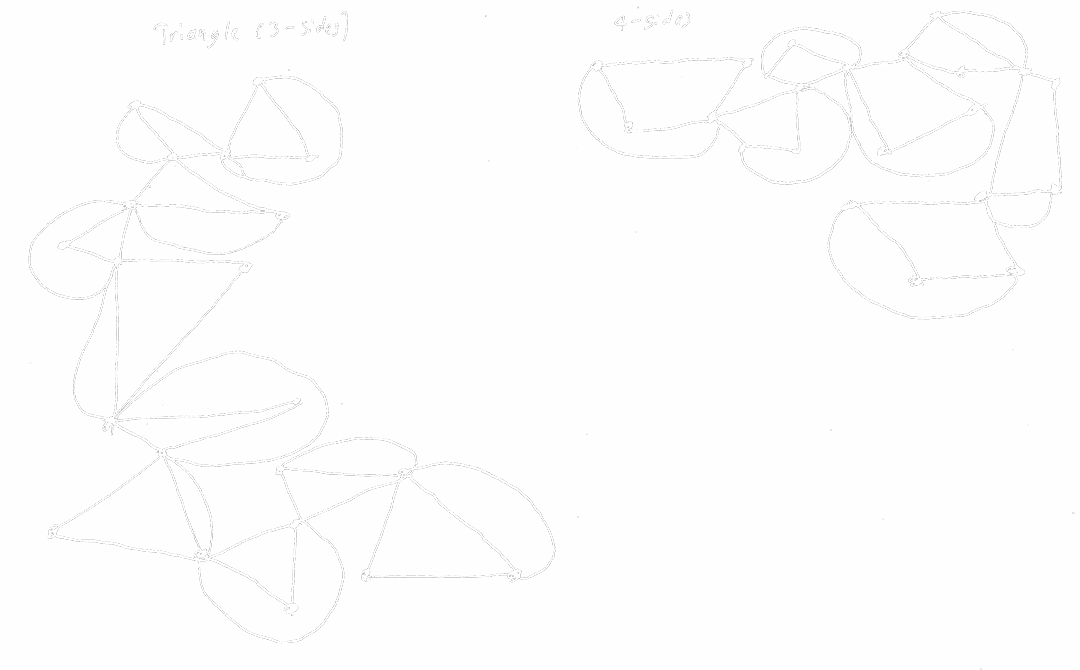
However, when I read the instructions for it, I immediately started to wonder what would happen if one would create an even more restricted, and in some sense more repetitive version of the game. In particular, I wanted to restrict the shapes allowed in the game. My idea was to only allow two kinds of shapes: curved lines and -sided shapes with only straight lines.
So I came up with the following rules to generate the drawings:
- Decide on a number . This will represent the number of sides of all shapes in the drawing with only straight lines
- Draw points
- Connect each of this newly drawn points to one other of the points.
- Connect two of these points with a curved line, without crossing any other line already drawn in the drawing (it's ok though to start/end in a point that either joins two straight-lined shapes or even is the start/end of another curved line)
- Now draw new points
- repeat at step 3. Consider the endpoint of the recently drawn curved line as a new point
[//] # "todo: thoughts on Computing without computers (short analysis & take away from the games)"
Computing with computer
First P5.js experiment: Draw some simple shapes
[//] # "todo describe setup react & p5"
Since I haven't used p5.js before, I decided to start with the exercise on drawing some simple shapes (opens in a new tab) with p5.js:
The code for this is pretty straightforward. I've added some logic (opens in a new tab) to place the dots on the round tree at random positions inside the ellipse:
function randomPointInEllipse(cx, cy, width, height) {
  // algo by: https://stackoverflow.com/a/5529199
  let rho = Math.random();
  let phi = Math.random() * 2 * Math.PI;

  // random coordinates inside the circle
  let x = Math.sqrt(rho) * Math.cos(phi);
  let y = Math.sqrt(rho) * Math.sin(phi);

  // scale to elipse
  x = (x * width) / 2.0;
  y = (y * height) / 2.0;

  return [cx + x, cy + y];
}

function drawRoundTree() {
  const cx = 100;
  const cy = 150;
  const width = 90;
  const height = 100;

  clear();

  stroke(255, 255, 255);
  strokeWeight(4);
  noFill();

  // crown
  ellipse(cx, cy, width, height);
  // main trunk
  line(cx, cy - 15, cx, cy + 110);
  // side branch
  line(cx - 20, cy + 5, cx, cy + 35);

  // leaves
  for (let i = 0; i <= 50; i++) {
    const [x, y] = randomPointInEllipse(cx, cy, width, height);

    strokeWeight(Math.random() * 4);
    point(x, y);
  }
}
EatTheCanvas
While trying to create an interactive version of the Sollewit wall drawing, I got inspired by a little "accident", which created a pattern that seemed to "eat" the canvas: